

What AI Agents Are, How Businesses Use Them, and Why Ignoring Them Is Expensive
You have probably heard the phrase “AI agents” more times in the last six months than in the previous five years combined. Every newsletter, every LinkedIn post, every technology vendor seems to be talking about them.
But most of that conversation is aimed at developers and CTOs — people who already know what a large language model is and have opinions about Python frameworks. If you run a business and you are not technical, the conversation has largely left you out.
This guide is for you.
No code. No jargon. No assumption that you know what an API is. Just a clear, honest explanation of what AI agents are, what they are actually doing inside real businesses right now, and how you can start thinking about what they could mean for yours.
What Is an AI Agent
Here is the simplest way to think about it.
A standard AI tool — like a chatbot on a website — answers a question and stops. You ask it something, it responds, and that is the end of its involvement. It does not do anything. It just talks.
An AI agent is different. Instead of answering and stopping, it receives a goal and then goes and works toward it — on its own, step by step, using whatever tools and information it has access to.
Think of it like the difference between asking a colleague a question and asking that colleague to handle the entire task. One gives you information. The other gets things done.
An AI agent can search the internet, read documents, fill out forms, send emails, update spreadsheets, check databases, call other software systems, and evaluate whether what it produced actually solved the problem — all without someone clicking buttons between each step.
That is what makes AI agents fundamentally different from everything that came before them. They do not just respond. They act.
To understand this more deeply, you can read our overview of what agentic AI is and how autonomous agents work.
Why Businesses Are Paying Attention Right Now
AI agents are not new in theory. The concept of autonomous software that pursues goals has existed in research for decades. What changed is that the underlying AI models became powerful enough to make agents actually useful — capable of reading context, making reasonable decisions, recovering from errors, and operating reliably across complex multi-step tasks.
The business case is straightforward. Most companies — regardless of size or industry — have a large volume of work that is structured, repetitive, and rule-based. Responding to standard customer enquiries. Processing invoices. Qualifying leads. Scheduling meetings. Pulling data from one system and updating another. Generating weekly reports.
This work is not creative. It does not require human judgement in most cases. But it consumes enormous amounts of human time, which means it consumes enormous amounts of money.
AI agents can handle this category of work — at scale, around the clock, with consistent accuracy — while your people focus on the work that actually needs them.
According to a 2026 PwC survey, 79% of US executives are already adopting AI agents in some form, and 66% of those report measurable productivity improvements. This is no longer a future trend. It is happening now, in businesses of every size.
How Businesses Are Actually Using AI Agents Today
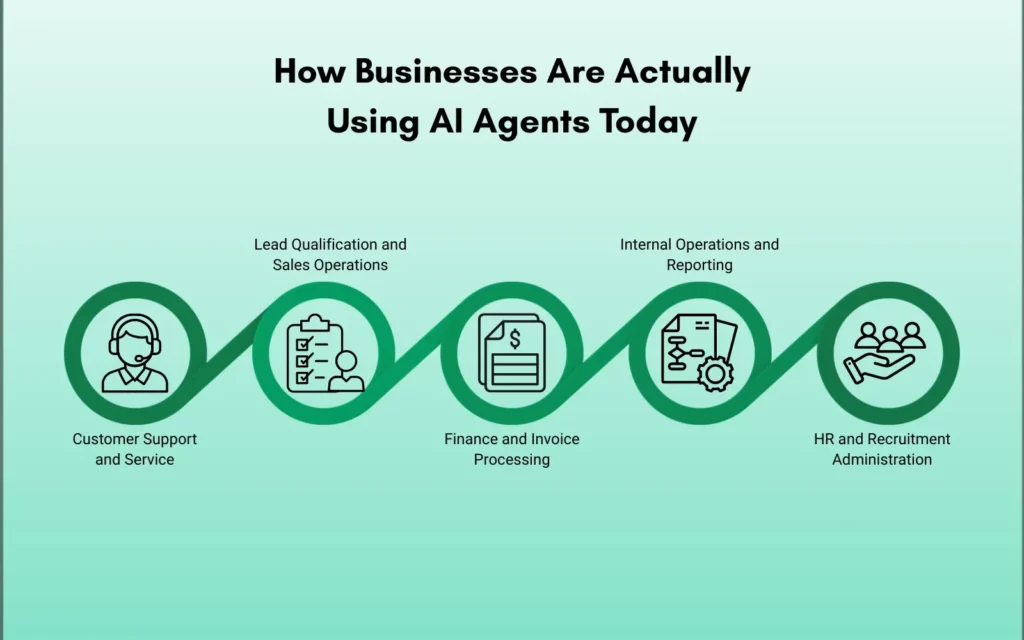
This is the part most guides skip over. Instead of explaining the concept further, here are the real ways companies are deploying AI agents right now — across different functions and business sizes.
Customer Support and Service
This is the most widely adopted use case. AI agents handle first-line customer enquiries — answering questions about orders, policies, pricing, availability, and account details — without involving a human agent for every interaction.
The difference from a basic chatbot is important. A standard chatbot follows a script. If you ask something outside the script, it breaks. An AI agent can read your question, understand the intent behind it, check your account history, look up the relevant policy, and give you a specific, accurate answer — even if no one pre-programmed that exact question.
For businesses handling hundreds or thousands of customer interactions daily, this is the difference between hiring five more support staff and not having to.
Read more about how AI-powered customer support works in software development contexts.
Lead Qualification and Sales Operations
AI agents are increasingly handling the top of the sales funnel — the part that is time-consuming but relatively mechanical. When a new lead comes in through a website form, an AI agent can research the company, score the lead against your ideal customer profile, check whether that contact already exists in your CRM, draft a personalised outreach email, and schedule a follow-up — before a human sales rep has even seen the notification.
This does not replace the salesperson. It removes the administrative layer that slows them down and means they spend their time only on leads that are already qualified and prepped.
Finance and Invoice Processing
Invoice processing is one of the clearest examples of a task that is perfect for AI agent automation. It is structured, repetitive, document-heavy, and error-prone when done manually at volume.
An AI agent can receive an invoice, extract the relevant data (vendor, amount, line items, due date), cross-reference it against purchase orders, flag discrepancies for human review, and route it through the approval workflow — all without manual data entry. What used to take a finance team member 15 minutes per invoice becomes a task completed in seconds.
Internal Operations and Reporting
Many businesses spend significant time each week pulling data from multiple systems, compiling it into reports, and distributing it to relevant teams. This is exactly the kind of multi-step, tool-using task that AI agents handle well.
An AI agent can be set to run every Monday morning — pulling sales data from one system, support ticket volumes from another, inventory levels from a third — compiling a formatted summary report and distributing it to the right people automatically. No one needs to build it manually. It just runs.
HR and Recruitment Administration
Screening CVs, scheduling interviews, sending follow-up emails to candidates, updating applicant tracking systems — these are the administrative layers of recruitment that consume HR team bandwidth without requiring deep human judgement.
AI agents are being used to handle initial CV screening against defined criteria, send personalised acknowledgement emails to applicants, schedule interviews based on calendar availability, and keep candidates updated throughout the process. The recruiter’s time is freed for conversations, assessments, and decisions.
AI Agents vs Traditional Software — What Is Actually Different
A fair question at this point is: how is this different from the automation software businesses have been using for years? Here is the clearest way to see it.
| Factor | Traditional Automation / RPA | AI Agents |
| How it works | Follows fixed rules — if A happens, do B | Pursues a goal, figures out the steps itself |
| Handles variation | Breaks when input changes unexpectedly | Reads context, adapts to variation |
| Setup requirement | Every rule must be pre-programmed manually | Configured with a goal and tools, not step-by-step rules |
| When something goes wrong | Stops and waits for a human to fix it | Attempts to recover, escalates only when truly stuck |
| Best for | High-volume, perfectly consistent, repetitive tasks | Complex, variable, multi-step tasks with shifting inputs |
| Flexibility | Low — rigid outside its defined rules | High — can make reasonable judgements on edge cases |
| Requires human involvement | Every time a new rule or exception is needed | At defined checkpoints for oversight and approval |
| Example | Auto-filling a form the same way every time | Reading an invoice, spotting a discrepancy, routing it correctly — even if the format is different |
That said, AI agents are not magic. They work best on tasks with clear goals, access to the right tools and data, and defined boundaries for when to hand off to a human. Understanding where that boundary sits is one of the most important decisions in any AI implementation.
For a deeper comparison, our blog on agentic AI vs RPA covers exactly when each approach makes sense.
What AI Agents Cannot Do — Honesty Matters Here
Any guide that only tells you the upside is selling you something. Here is the honest version.
AI agents make mistakes. They can misinterpret instructions, hallucinate information that does not exist, or make a decision that a human would immediately recognise as wrong. The more complex the task and the more ambiguous the goal, the higher the risk of errors.
This is why the most effective AI agent implementations include a human-in-the-loop design — meaning a human reviews or approves the agent’s output at defined points before it takes consequential action. A well-designed agent escalates when it is uncertain rather than guessing.
AI agents also depend entirely on the quality of the data and systems they connect to. An agent trying to process invoices from a chaotic, inconsistent data system will produce chaotic, inconsistent results. Garbage in, garbage out — this principle does not disappear because you added AI.
And AI agents require upfront investment in integration, testing, and monitoring. They are not plug-and-play. A business that deploys an AI agent without proper configuration and oversight will not save time — they will create new problems to manage.
Done right, however, the return on that investment is significant and compounding. The agent does not take sick days. It does not slow down when volume spikes. And it gets more reliable as it is refined over time.
What This Means for Your Business Practically
If you are an SMB owner reading this and wondering whether AI agents are relevant to your size and budget — the honest answer is yes, but context matters.
Start by identifying your highest-volume, most repetitive operational tasks. The work your team does every day that follows the same pattern, uses the same inputs, and produces the same type of output. That is your best starting point for AI agent automation.
Ask yourself three questions about each candidate task:
Is the task repetitive and rule-based enough that the steps could be written down clearly? If yes, an agent can likely handle it.
Does a mistake in this task have low to medium consequences — something a human can catch and correct — or is it high-stakes enough that every output needs human sign-off? The answer determines how much human oversight you build in.
Do you have clean, accessible data for the agent to work with? If the answer is no, fixing the data problem comes first.
You do not need to automate everything at once. The businesses getting the most value from AI agents right now are starting with one well-scoped use case, getting it working properly, measuring the impact, and then expanding from there.
For context on what full AI integration into business operations can look like — and what it typically costs — our guide on AI integration cost for enterprises is a practical starting point.
And to understand the broader shift happening across the technology sector, our blog on how AI is impacting the IT service sector covers the wider context.
Real-World AI Agent Use Cases by Business Function — Quick Reference
| Function | What an AI Agent Can Handle |
| Customer Support | First-line enquiries, order status, policy questions, ticket routing |
| Sales | Lead research, CRM updates, outreach drafting, follow-up scheduling |
| Finance | Invoice extraction, PO matching, discrepancy flagging, approval routing |
| Operations | Report generation, data aggregation, cross-system updates |
| HR | CV screening, interview scheduling, candidate communications |
| Marketing | Content briefing, performance report compilation, SEO data pulling |
Ready to Explore What AI Agents Could Do for Your Business?
Understanding AI agents is one thing. Knowing how to apply them to your specific operations — your systems, your workflows, your team — is where the real value comes from.
Betatest Solutions helps businesses integrate AI into their operations in a way that is practical, well-scoped, and built to last. Whether you are starting from zero or looking to expand an existing AI workflow, our team works with you to identify the right use cases, build the right solution, and make sure it actually delivers.
No jargon. No overselling. Just a clear conversation about what is possible for your business specifically.
Explore Betatest Solutions AI Integration and Software Development Services →
Frequently Asked Questions
Not to use them — but you do need a partner who has technical knowledge to build and implement them properly. The day-to-day operation of a well-configured AI agent requires no technical involvement from your team. The setup, integration, and ongoing monitoring is where expertise matters.
No. A chatbot responds to questions within a pre-defined script and stops there. An AI agent pursues a goal across multiple steps — using tools, making decisions, and taking actions — without needing a human to manage each step. The gap between them is significant.
A focused, well-scoped AI agent — built for a single clear task like lead qualification or invoice processing — typically takes three to eight weeks to build, test, and deploy properly. More complex implementations involving multiple systems or multi-agent workflows take longer. Rushing this phase is one of the most common reasons implementations fail.
Good AI agent design includes checkpoints where a human reviews the agent’s output before consequential action is taken. For lower-stakes tasks, errors are logged and surfaced for periodic review. The goal is not a system that never makes mistakes — it is a system where mistakes are caught before they cause damage.
No. Some of the clearest ROI cases for AI agents are in smaller businesses — where a single agent handling customer support or invoice processing can save the equivalent of a part-time hire. The key is choosing the right scope for your size and not overbuilding in the first phase.
Tools like Zapier are rule-based — if this happens, do that. They are fast to set up and reliable within their rules but cannot handle ambiguity or variation. AI agents can read context, interpret variation, and make judgement calls — which makes them more capable for complex tasks but also more involved to implement correctly.